XBeach regular grid
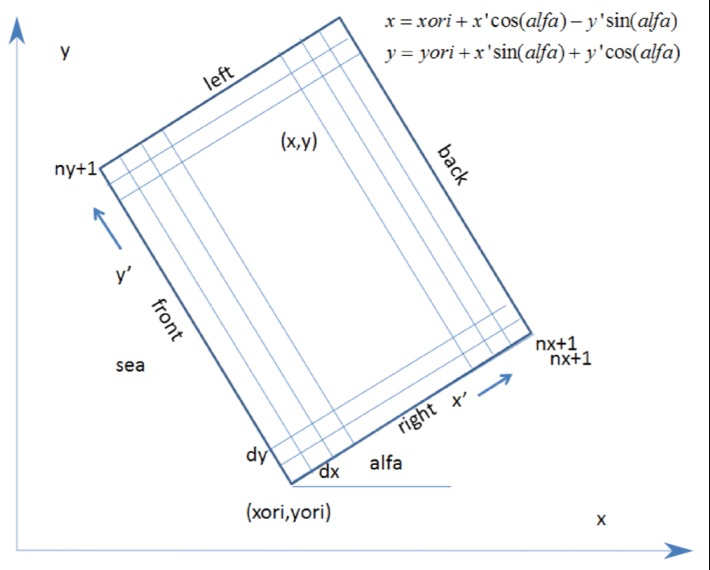
Usage demo for the XBeach RegularGrid object (image modified from the xbeach docs)
Requirements
- Clone and install the main version of rompy-xbeach
- The OSM land plot requires datamesh token to query the OSM land polygon but it is only for demonstration purposes
%load_ext autoreload
%autoreload 2
import matplotlib.pyplot as plt
import cartopy.crs as ccrs
import cartopy.feature as cfeature
import geopandas
from shapely.geometry import shape

from rompy_xbeach.grid import GeoPoint, RegularGrid

import warnings
warnings.filterwarnings("ignore")
Grid origin
The origin of the RegularGrid is defined using the GeoPoint object which holds the
coordinates of the origin x, y and the crs in which the coordinates are defined,
allowing to define the origin in different coordinate systems such as WGS84 or projected
coordinates
ori = GeoPoint(x=115.5875, y=-32.646, crs=4326)
ori
GeoPoint(x=115.5875, y=-32.646, crs='EPSG:4326')
A GeoPoint instance can be reprojected
ori_projected = ori.reproject(28350)
ori_projected
GeoPoint(x=367520.0758689749, y=6387075.392325714, crs='EPSG:28350')
ori_projected.reproject(4326)
GeoPoint(x=115.58749999999999, y=-32.646, crs='EPSG:4326')
Create the grid
The other parameters to construct the grid are similar to the other regular grid objects
in rompy with the inclusion of the field crs to define the coordinate reference system of the
xbeach grid. Note the origin coordinates can be prescribed in any known coordinate system
grid = RegularGrid(
    ori=GeoPoint(x=115.5875, y=-32.646, crs="epsg:4326"),
    alfa=344.0,
    dx=10,
    dy=20,
    nx=270,
    ny=305,
    crs="28350",
)
grid
RegularGrid(ori=GeoPoint(x=115.5875, y=-32.646, crs='EPSG:4326'), alfa=344.0, dx=10.0, dy=20.0, nx=270, ny=305, crs='EPSG:28350')
Projected origin coordinates
# The x0, y0 properties are the coordinates of the origin in the grid's crs
# (regardless of the crs defined in Ori)

grid.x0, grid.y0
(367520.0758689749, 6387075.392325714)
Centre of the offshore boundary
grid.offshore
(368358.01343065855, 6389997.627881368)
Centre of the grid
grid.centre
(369650.91041169566, 6389626.895637793)
Grid shape
grid.shape
(305, 270)
Stereographic projection
# A stereographic projection centered on the origin of the grid

grid.projection
<cartopy.crs.Stereographic object at 0x74a8b6707800>
Cartopy transform
# The cartopy transform to reference the grid data when plotting

grid.transform
<cartopy._epsg._EPSGProjection object at 0x74a8b6707950>
Grid GeoDataFrame
# A MultiPolygon geometry representing each cell in the grid

grid.gdf
| geometry | Name | |
|---|---|---|
| 0 | MULTIPOLYGON (((367520.076 6387075.392, 367529... | {'grid_type': 'base', 'model_type': 'regular',... |
Coordinates of the different sides
# Tuples of the (x, y) coordinates of each grid side. Uncomment to visualise

# grid.front
# grid.back
# grid.left
# grid.right
Plot the grid
A plotting method has been defined to allow dealing with different crs and projections. The offshore boundary and the grid origin are overlaid by default to help positioning the grid correctly
ax = grid.plot()

Coastlines
The coastlines from the GSHHS database are used which can be slower to plot but are considerably more detailed than the "10m" resolution version used by default in Cartopy
# Coastlines are defined by specifying the GSHHS resolution

ax = grid.plot(scale="f")

Grid mesh
The grid mesh can be overlaid
# The full mesh is shown by default but they can be downsampled for better visualisation

ax = grid.plot(scale="i", show_mesh=True, mesh_step=10)

# The appearance of the mesh can be customised using standard matplotlib parameters

ax = grid.plot(
    scale="i",
    show_mesh=True,
    mesh_step=20,
    mesh_kwargs=dict(color="red", alpha=0.5, linewidth=1.0),
)

Grid boundaries
The offshore boundary is highlighted by default but all boundaries can explicitly overlaid
# Plot a transparent grid without the origin and offshore side highlighted
ax = grid.plot(
    scale="f",
    grid_kwargs=dict(facecolor="none"),
    show_origin=False,
    show_offshore=False,
)

# Use the grid attributes to plot each side of the grid
ax.plot(grid.front[0], grid.front[1], "c", transform=grid.transform, label="Front")
ax.plot(grid.left[0], grid.left[1], "r", transform=grid.transform, label="Left")
ax.plot(grid.back[0], grid.back[1], "b", transform=grid.transform, label="Back")
ax.plot(grid.right[0], grid.right[1], "g", transform=grid.transform, label="Right")

l = ax.legend(loc="upper left")

Projections
Cartopy projections are fully supported
# Use a PlateCarree projection

ax = grid.plot(
    scale="f",
    projection=ccrs.PlateCarree(),
    grid_kwargs=dict(alpha=0.5, facecolor="black", zorder=2),
)

Land masks
It is possible to use land masks other than the GSHHS ones. In the example below we are going to define an arbitrary a GeoDataFrame object with some land Polygon to exemplify it
def get_land_feature() -> geopandas.GeoDataFrame:
    """Generate GeoDataFrame with a Polygon feature representing the land."""
    feature = cfeature.NaturalEarthFeature(category="physical", name="land", scale="10m")
    return geopandas.GeoDataFrame(
        geometry=[shape(feature) for feature in feature.geometries()], crs="EPSG:4326"
    ).dissolve()


land = get_land_feature()
land
| geometry | |
|---|---|
| 0 | MULTIPOLYGON (((-170.84708 -83.00543, -171.339... |
# Plot the grid initially without any land mask
ax = grid.plot(projection=ccrs.PlateCarree(), show_offshore=False)

# Plot the land mask separately
ax = land.plot(ax=ax, transform=ccrs.PlateCarree(), color="gray")

Compare the different GSHHS coastline scales
fig, axs = plt.subplots(1, 5, figsize=(20, 4), subplot_kw=dict(projection=grid.projection))

resolution = {
    "crude": "c",
    "low": "l",
    "intermediate": "i",
    "high": "h",
    "full": "f",
}
for ax, (key, value) in zip(axs, resolution.items()):
    grid.plot(ax=ax, scale=value, buffer=5000)
    ax.set_title(key)

Compare the different NaturalEarthFeature scales
fig, axs = plt.subplots(1, 3, figsize=(11, 3.5), subplot_kw=dict(projection=grid.projection))

for ax, scale in zip(axs, ["110m", "50m", "10m"]):
    ax.add_feature(cfeature.LAND.with_scale(scale), facecolor="0.7", edgecolor="0.3", linewidth=0.5)
    grid.plot(ax=ax, scale=None, buffer=5000)
    ax.set_title(scale)

Expand the grid
The grid can be expanded which is useful when extending the offshore and lateral boundaries
# Individual sides are expanded by a specified number of cells

grid_extended = grid.expand(left=5, right=5, front=30)

print(grid)
print(grid_extended)
RegularGrid(ori=GeoPoint(x=115.5875, y=-32.646, crs='EPSG:4326'), alfa=344.0, dx=10.0, dy=20.0, nx=270, ny=305, crs='EPSG:28350')
RegularGrid(ori=GeoPoint(x=115.58413040314187, y=-32.64608321400174, crs='EPSG:4326'), alfa=344.0, dx=10.0, dy=20.0, nx=300, ny=315, crs='EPSG:28350')
fig, ax = plt.subplots(figsize=(6, 6), subplot_kw=dict(projection=grid.projection))

grid_extended.plot(ax=ax, scale="i", grid_kwargs=dict(facecolor="y", edgecolor="k", alpha=0.5, zorder=2))
grid.plot(ax=ax, grid_kwargs=dict(facecolor="k", edgecolor="k", alpha=0.5, zorder=3))
<GeoAxes: >

Save the grid
A custom method is provided to save the grid as a MultiPolygon GeoDataFrame object which can be visualised on GIS software
grid.to_file("grid.kml", driver="KML")
2025-10-02 18:20:41 [INFO] pyogrio._io : Created 1 records
Open and visualise it on GGE
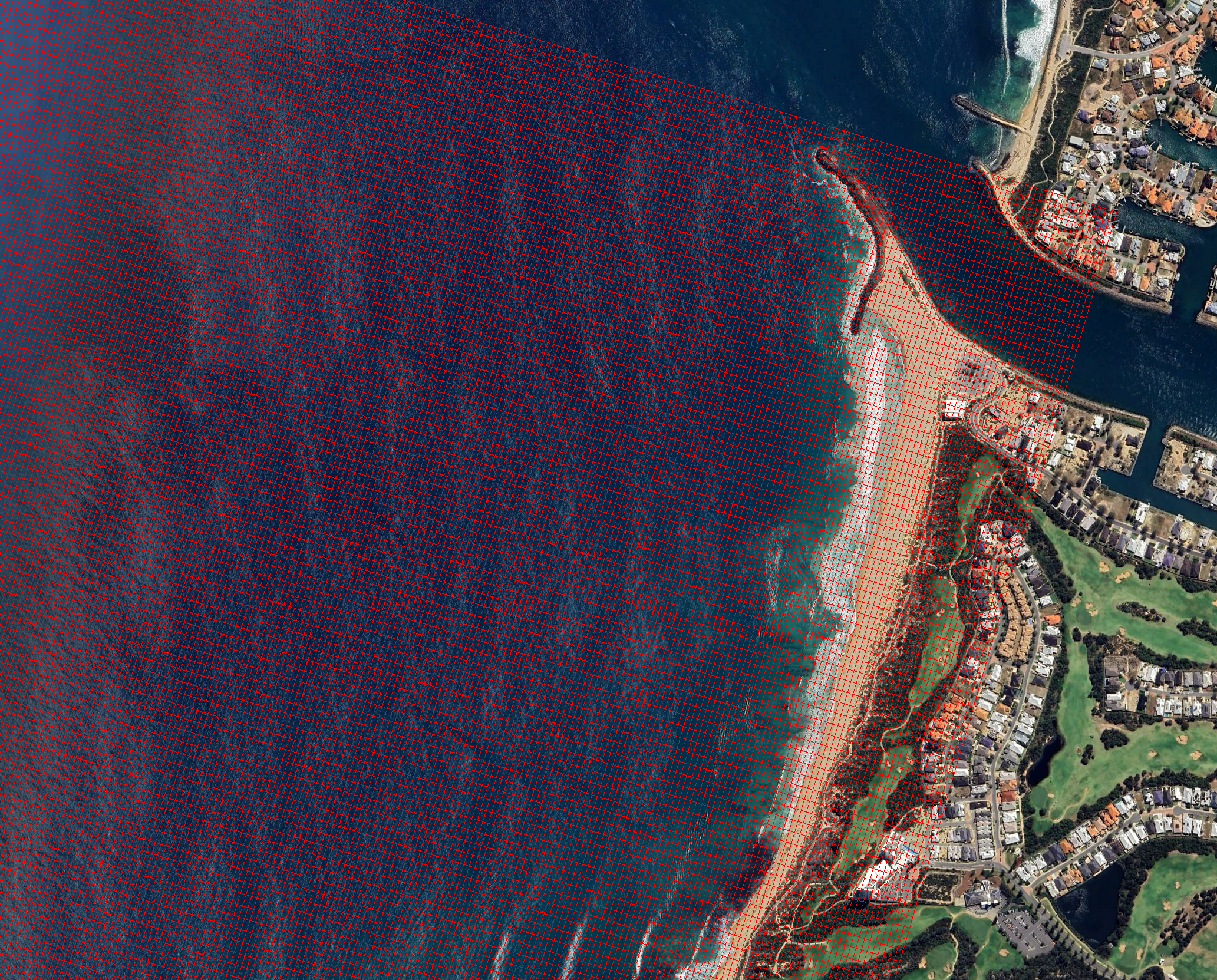
Alternatively, a GeoDataFrame of the grid boundaries can be defined and saved to file (which can be useful if the grid is too large)
import geopandas as gpd

gdf = gpd.GeoSeries(grid.boundary(), crs=grid.crs)
gdf.to_file("grid_boundaries.kml", driver="KML")
2025-10-02 18:20:41 [INFO] pyogrio._io : Created 1 records
Recreate the grid
The (full) grid file also stores some grid metadata to allow recreating a grid object (making it easy to share)
grid2 = RegularGrid.from_file("grid.kml")
grid2.plot(scale="i")
<GeoAxes: >
